Policy locks
Policy locks let manager tenants control which parts of a distributed policy their child tenants can change. When you lock a section of a policy you distribute, child tenants can still see the configuration but can't edit it, and the locked section is overwritten with your version on every distribution push.
Policy locks apply only in multi-tenant manager environments: environments where one tenant (a manager) distributes policies to one or more child tenants. If your console isn't set up that way, you won't see lock controls.
What a policy lock does
A policy lock freezes a section of a distributed policy for child tenants. Locking has three effects:
- Child tenants can view the section but not edit it. The section shows a "Managed" indicator in the header and the section content is grayed out in the Policy Editor.
- Locked sections always overwrite on distribution. Unlocked sections only overwrite when the child hasn't modified them. Locked sections overwrite regardless.
- Locks pass down the hierarchy. Any lock you set applies to your children, and to their children, and so on. Locks you inherit from your own manager are applied on top.
You can lock these sections of a policy:
- Detection
- Safeguard
- Integrations
- Advanced settings
- Browser controls
Requirements
- A multi-tenant manager environment where your tenant distributes policies to one or more child tenants.
- A policy that has been distributed. Locks live on the distributed copies, so they only take effect once a policy has children.
Getting started
To lock a section of a distributed policy:
- Navigate to Policies in the console.
- Open the policy you want to lock.
- Expand the section you want to lock (for example, Detection or Safeguard).
- Toggle Lock in the section header.
- Click Save.
- Distribute the policy to push the lock to child tenants.
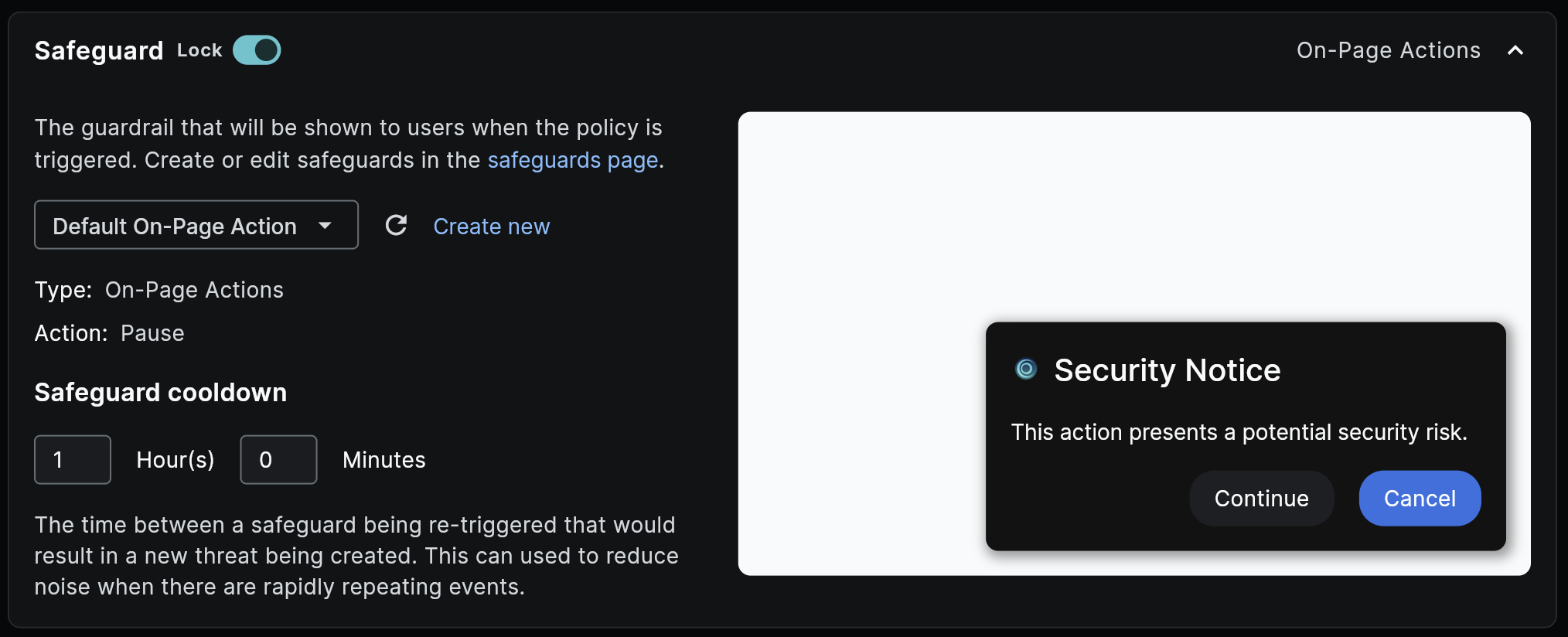
The next time the policy is distributed, child tenants receive the lock and the section's current values. From that point on, the locked section is read-only for them.
To unlock a section, toggle Lock off and save. See Removing a lock for what child tenants experience after a lock is removed.
Lockable sections
Each lock applies to a whole section of the Policy Editor. Locking a section freezes everything configured inside it.
- Detection — The activity types, detection query, and conditions that determine when the policy triggers.
- Safeguard — The user-facing response, including the safeguard selection, display style, messages, options, and cooldown. See Managed safeguards for how this section behaves when the selected safeguard is owned by an upstream tenant but the section itself isn't locked.
- Integrations — Where events are sent when the policy triggers, including SIEM forwarding, evidence collection, reporting, and threat creation.
- Advanced settings — Policy priority and severity.
- Browser controls — Technical browser-level controls such as HTTPS enforcement, paste redaction, and permission blocking. Only present on policies in the Browser Control category.
Locks apply at the section level. You can't lock individual fields within a section.
How locks behave across tenants
Locks add as they pass down the hierarchy
A child tenant can't unlock anything a parent locked. If you're a manager who is also a child of another manager, any locks you inherit from above are always in effect, and the locks you add apply on top of them.
For example, if Keep Aware locks Detection on a feed policy distributed to your tenant, you can still lock Safeguard for your own children, but you can't unlock Detection for them.
Removing a lock unlocks the section going forward
When you turn off a lock and redistribute, child tenants can edit that section again. The child keeps whatever values your last push contained. Removing a lock doesn't restore any earlier customization the child may have made before the lock was applied.
Locked sections always overwrite on distribution
Each section of a policy has a modified state that tracks whether a child tenant has changed it. Distribution behavior depends on both the lock and the modified state:
| Section state | What happens on distribution push |
|---|---|
| Locked | Overwritten with the manager's values |
| Unlocked, not modified by child | Overwritten with the manager's values |
| Unlocked, modified by child | Child's customization is preserved |
Locking a section is the only way to guarantee that your version of the section wins on every push.
What child tenants see
When a child tenant opens a policy with one or more locked sections, the locked sections show a "Managed" indicator next to the section header. Hovering the info icon next to the indicator shows a tooltip explaining that the section is managed by the parent organization. The section content is visible but grayed out, and the editor controls inside are disabled.
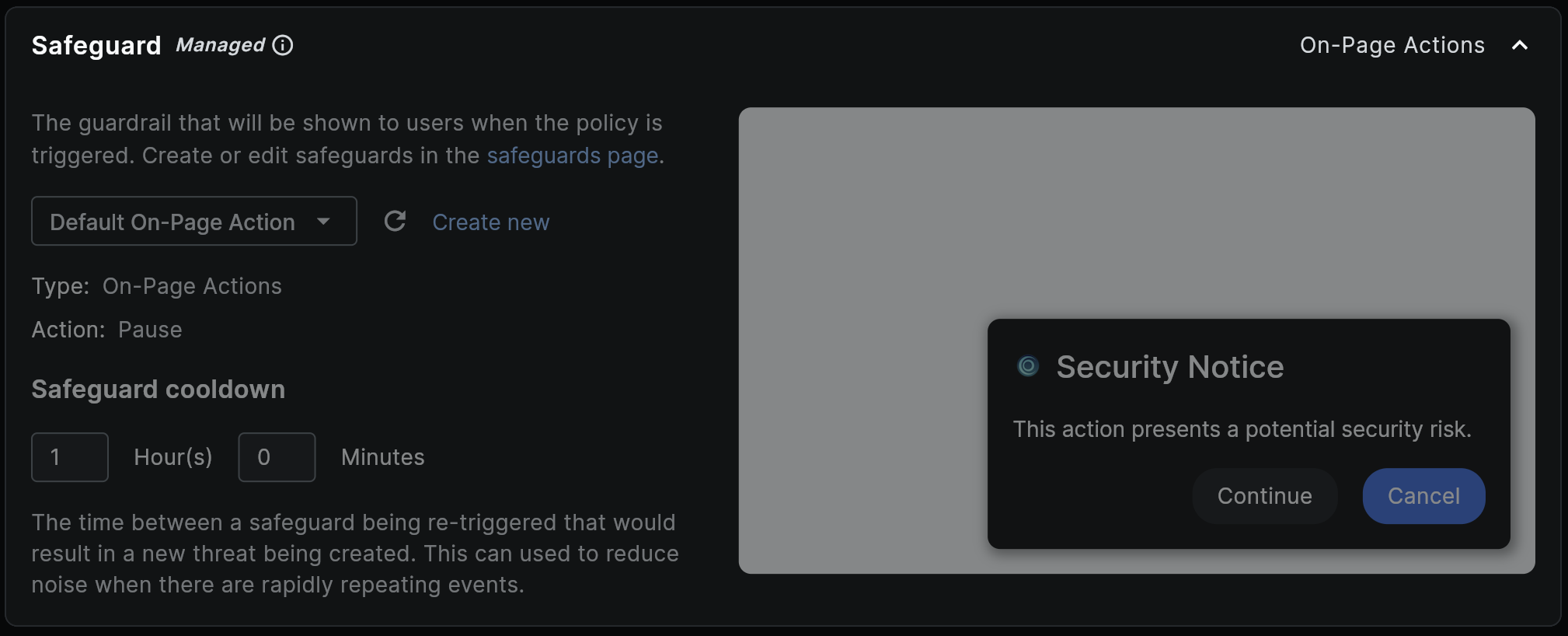
Child tenants can still edit any unlocked sections of the same policy, save, and trigger their own customizations. Those changes are preserved on future distribution pushes as long as the section stays unlocked.
Managed safeguards
The Safeguard section has an additional consideration. Safeguards are reusable entities owned by a specific tenant, so the selected safeguard can be managed by your parent organization even when the Safeguard section itself isn't locked.
There are two cases a child tenant may see:
- Safeguard section is locked. The section header shows a "Managed" indicator and the whole section is grayed out, exactly like any other locked section. The child can't change which safeguard is selected and can't edit any of its settings.
- Safeguard section is unlocked, but the selected safeguard is owned by an upstream tenant. The section header still shows a "Managed" indicator, and a banner appears inside the section: "Managed by your parent organization — You can switch to a different safeguard, but this one's settings and cooldown can only be changed by the tenant that owns it." The child can pick a different safeguard from the dropdown. If they switch to a safeguard owned by their own tenant, the banner disappears and the section is fully editable.
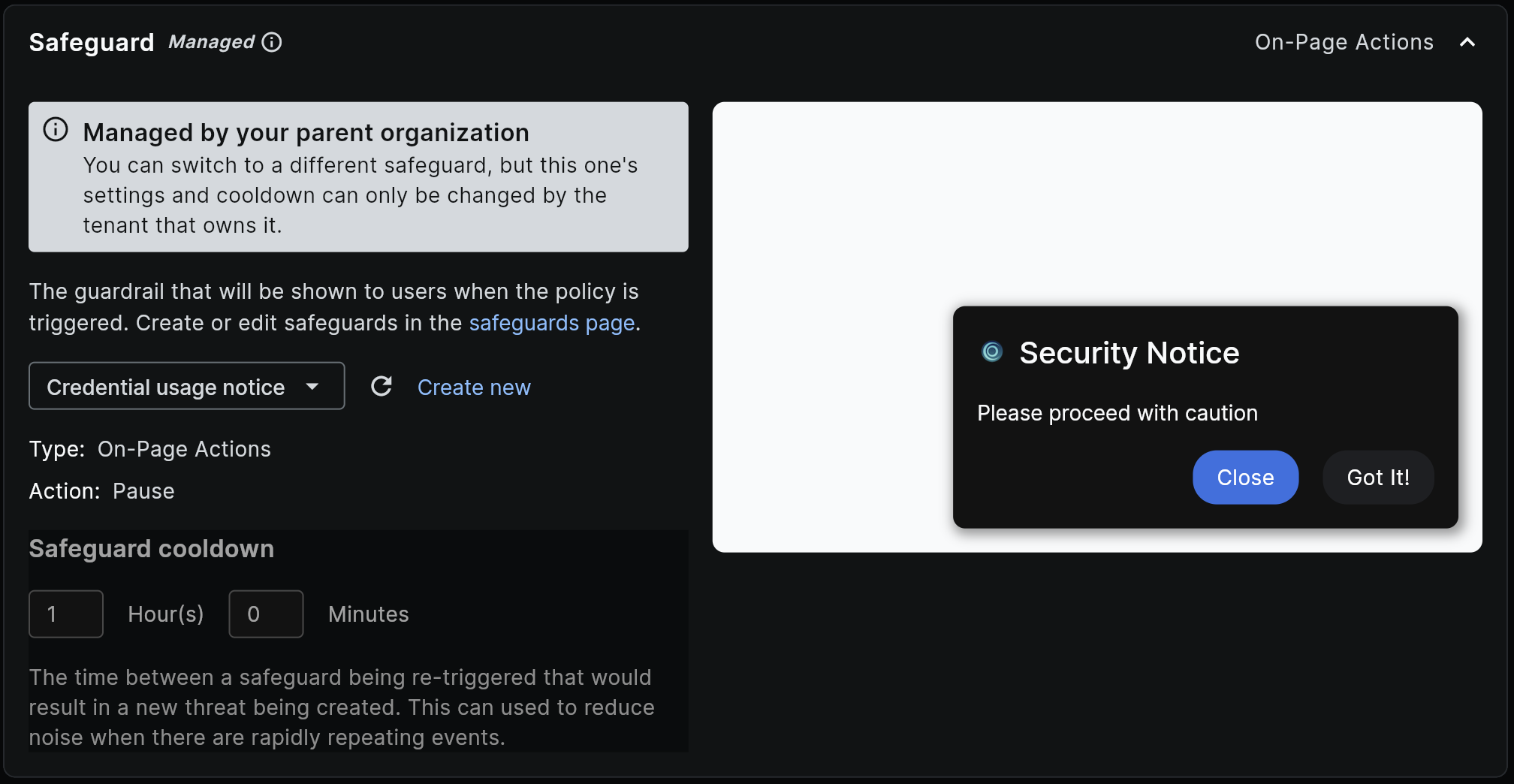
This distinction matters because a parent tenant often wants to enforce a specific safeguard while still letting children swap in their own. Locking the Safeguard section enforces the safeguard selection itself. Leaving the section unlocked and distributing a safeguard owned by your tenant lets children swap to their own safeguard while protecting the configuration of yours.
Default safeguards shipped by Keep Aware (for example, "Default Page Block") aren't owned by any tenant and don't trigger the managed-safeguard banner.
Frequently asked questions
| Question | Answer |
|---|---|
| Which sections can I lock? | Detection, Safeguard, Integrations, Advanced settings, and Browser controls. Locks apply to the whole section, not individual fields. |
| Can I lock fields individually? | No. Locks are scoped to a section. If you need to enforce a specific field, lock the section that contains it. |
| What happens to a child's customizations if I lock a section they've already changed? | The lock takes effect on the next distribution push, which overwrites the section with your values. The child's customization in that section is lost. |
| If I remove a lock, does the child get their previous customization back? | No. The child keeps whatever values were in place when the lock was removed and can edit the section from that point on. |
| Do locks apply to the Best Practices Feed? | Yes. Feed policies distributed by Keep Aware ship with Detection locked by default, which is why feed policies can't have their detection logic edited. See Best Practices Feed for details on the feed itself. |
| What's the difference between a locked Safeguard section and a "managed" safeguard? | A locked Safeguard section freezes the entire section, so the child can't change the safeguard selection or any of its settings. A managed safeguard means the currently-selected safeguard is owned by an upstream tenant. If the section isn't locked, the child can switch to a different safeguard, but can't edit the one your tenant owns. See Managed safeguards. |
| I'm a child tenant. Can I request a lock be removed? | Contact the manager tenant that distributes the policy. Locks can only be changed by the tenant that set them, or by a tenant above them in the hierarchy. |
| Can a manager re-distribute a policy without overwriting unlocked customizations? | Yes. Sections that are unlocked and have been modified by the child are preserved on every push. Only locked sections and unmodified unlocked sections are overwritten. |