Shadow IT & Browser Extensions
Keep Aware tracks and reports upon browser extensions (also known as browser add-ons) across your environment. Information on browser extensions is useful for identifying shadow IT (e.g., a nonsanctioned AI or productivity extension) and malicious extensions (e.g., an overly permissive extension). Keep Aware also uses multiple data points, including an extension's metadata and manifest file, to calculate an extension's risk score.
Getting Started
View web applications and relevant metadata in the Catalog > Extensions area. Sort by Score.
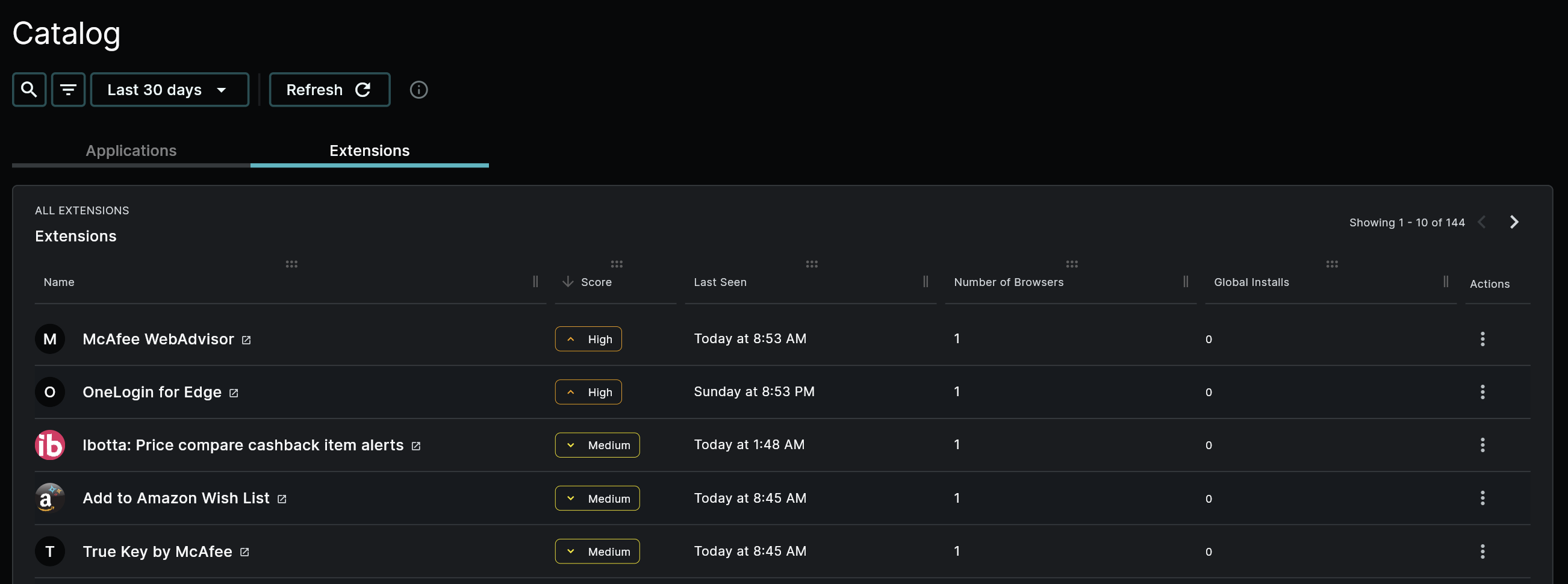 Image: Browser Extensions Catalog Overview
What is a Browser Extension?
Additional software integrated directly into the browser, an extension presents an inherent risk to browser data, and thus to the organization.
View the list of extensions identified across your organization in the Catalog > Extensions area.
For a further breakdown of a browser extension's components, refer to our Extension Components documentation.
Extension Details
To view details of a particular extension from the Catalog > Extensions area, click the extension of interest and view the details page, which will provide similar information as shown below.
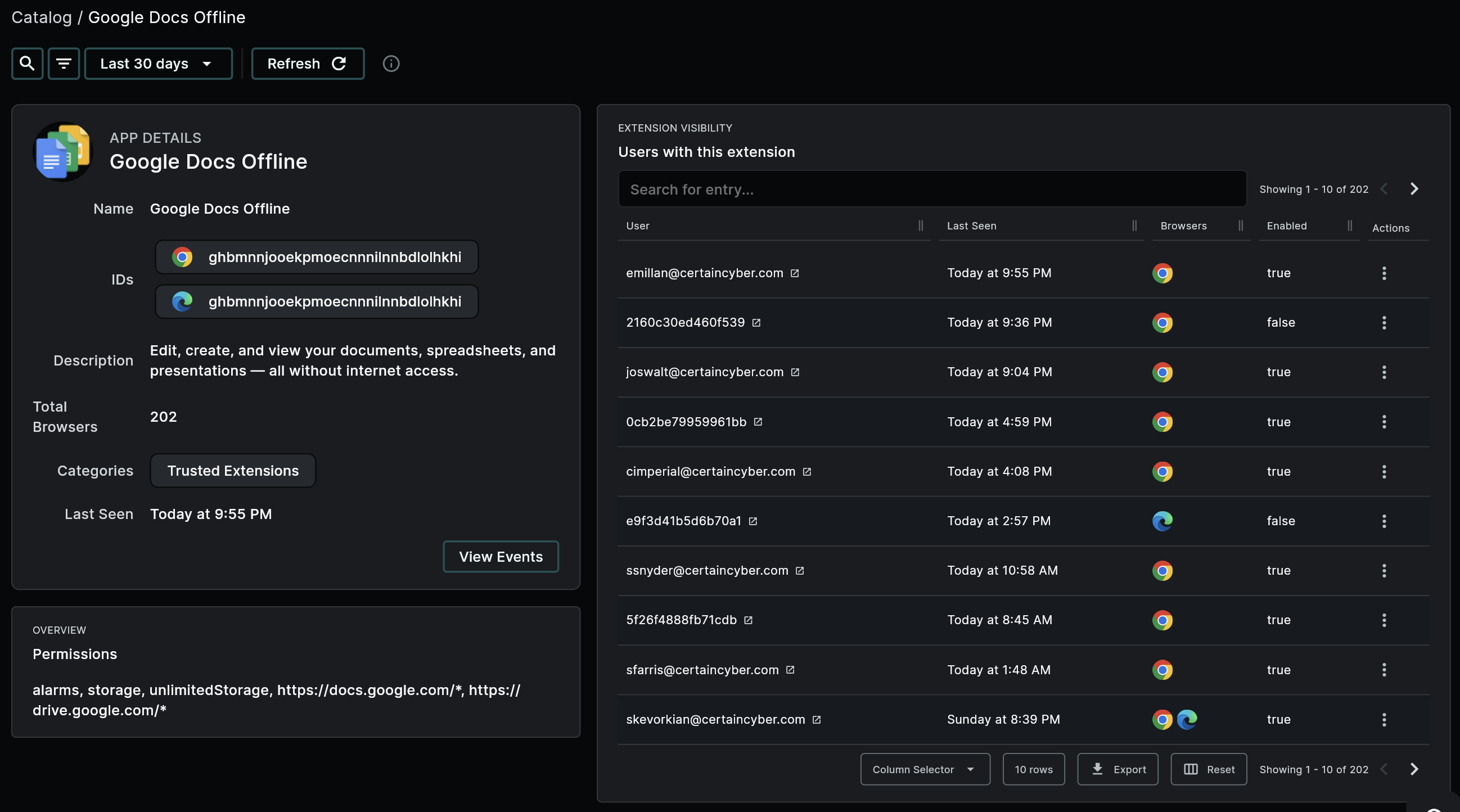 Image: Example Extension Details, Google Docs
Noteworthy details of an extension include:
- Extension ID: Extensions are grouped by their unique ID.
- If extensions have the exact same name but differents IDs, this can indicate either a different major version of the extension or a (likely malicious) doppleganger.
- Description: The description of the extension as provided by its manifest file.
- Recommendation: Compare this to the extension's permissions to find inconsistencies that may indicate the extension is requesting permissions outside of its stated functionality.
- Total Browsers: The number of unique browsers that have this extension installed.
- If this number is very low (Think: fewer than 5), it could indicate a potentially malicious extension.
- If this number is low (Think: around 10-20% of your organization) and not part of a trusted extensions category, this could indicate a legitimate extension used by a department, but it may be unnaproved and is thus shadow IT.
- Categories: Any lists the extension ID is a part of.
- Recommendation: Create seperate lists to store the IDs of extensions that are blocked/restricted and those that are trusted/approved. These lists can then be used to automatically block untrusted extensions (through the use of Patterns) and to rapidly identify trusted extensions (during investigations), respectively.
- Permissions and Host Permissions: A list of permissions the extension has requested to use and a list of hosts (e.g.,
http://*/*) these permissions can be applied to.- Recommendation: Compare these to the extension's description to find inconsistencies that may indicate the extension is requesting permissions outside of its stated functionality.
- Users with this Extension: A table of users, browsers, and other extension-specific information. Search in this table using a string search.
- Recommendation: Use the Column Selector to view/hide extension-specific fields.
Extension-Specific Fields
For a lsit of extension-specific fields, refer to Extension Fields.
Extension's Risk Score
The quantified risk of a browser extension. An extension's risk score is calculated using multiple data points, including:
- extension type
- extension install type
- permissions
- host permissions
- update URL
- rarity within your organization
The higher the score, the more risky the extension is considered.
Finding the Score
An extension's risk score is displayed in both the Catalog > Extensions area and on individual extension events.
- Extension Overall: View the overall risk score of an extension (e.g., Google Docs Offline) in the Catalog > Extensions area.
- Extension Event: View the extension risk score of an individual extension event (specifically,
type:"enable_extension" OR type:"install_extension") wherever you are searching or viewing events in the Console, such as in the Events page. Use the Column Selector to ensure you can view thescorefield.
A Note on Security Extensions
Often, you will find any security-focused extensions, such as a password manager, scored as high risk. Security extensions are more likely than not going to be classified as higher risk extensions primarily because, to perform their expected functionality, they often request uncommon permissions and an above-normal number of them.
- Recommendation: If any security extension appears in your environment, confirm that is legitimate and approved for your organization or for that department to use, and add it to a list of trusted or untrusted extensions.
Further Reading on Extension Security
For an overarching documentation on extension security—from the fundamentals and risks to common issues and the Keep Aware advantage—refer to Browser Extension Security.
Further Reading on Shadow IT
For an overarching documentation on managing Shadow IT—everything from the fundamentals and risks to common issues and the Keep Aware advantage—refer to Shadow IT Management.
Browser Extensions
---
Web Applications
---