Testing Browser Security Controls
Keep Aware provides a library of identified phishing, social engineering, and malicious traffic sites that can be used for testing. While these websites are pulled and scrubbed for in the wild phishing attempts we have researched, these domains are hosted by Keep Aware. These sites are to be used purely to test Keep Aware browser security controls.
Requirements
- Access to your Keep Aware Console
- Keep Aware added to your browser and connected to your tenant
- The User-Agent Switcher for Chrome extension (Soon to be replaced by native implementation in the Keep Aware extension)
Getting Started
Keep Aware hosts a series of websites in a threat lab environment that can be used to test various browser security controls against phishing, social engineering, data leakage, and more. In order to provide a consistent experience and safe environment for Keep Aware clients, we require the browser to have a specific user-agent to access this environment. To get started, ensure you have access to your Keep Aware console and the ability to install Chrome extensions.
Installing User-Agent Switcher
To access examples in the threat lab, your browser will need a specific user-agent. If imported from our example, this should not affect any other work environment or browsing session, and can be uninstalled at any time. User-Agent Switcher for Chrome is developed by Google and can be downloaded directly from the Chrome extension web store.
Download the extension, and once installed, navigate to the extension options page. This page can be found under the extension's page in your browser, or visited directly using this URL in a new tab:
chrome-extension://djflhoibgkdhkhhcedjiklpkjnoahfmg/options.html
Then, from the left menu on the options page, click Import/Export Settings.
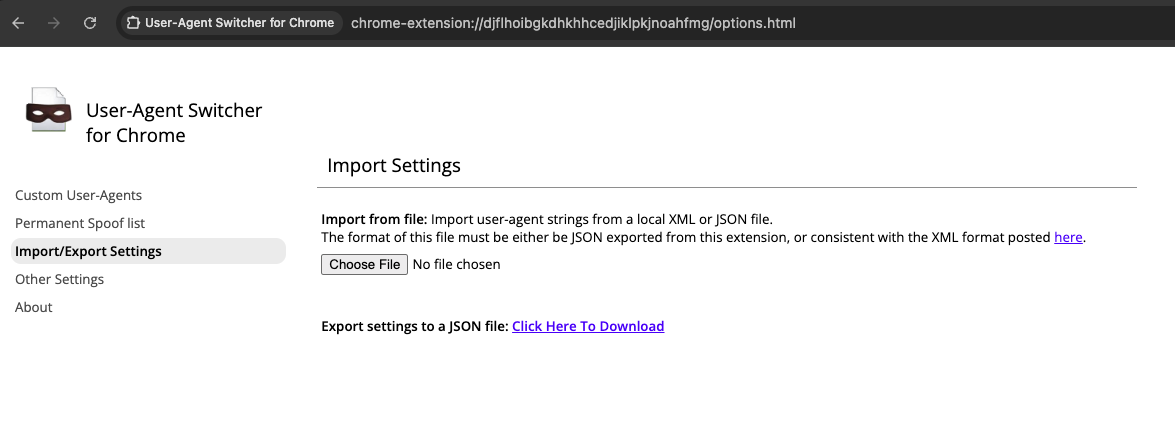
Image: User-Agent Switcher Extension Options Page
Lastly, download the template below and upload it through the Import function of the extension:
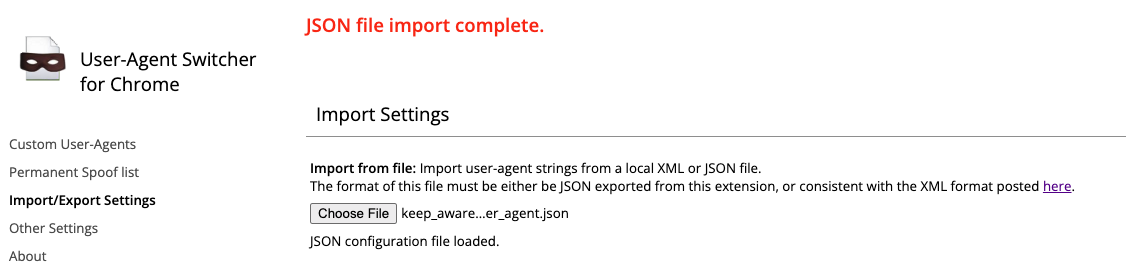
Image: Successful User-Agent Import
Keep Aware Labs Findings
With your user-agent switcher in place, it will use a dedicated Keep Aware Labs user agent only for specific Keep Aware websites. Keep Aware's threat research team maintains a library of phishing, social engineering, and malicious sites found in the wild. By visiting Keep Aware lab domains, you can inspect these and use them for testing your browser security controls.
Domains in Use: These are domains owned by Keep Aware and are completely safe to run in your browser. For cases where you are blocking access to a Keep Aware test website, you can create exceptions for the following domains on your other systems:
doc-viewer.com
The referenced domains are safe to use for testing and are owned by Keep Aware. Phishing and malicious sites have be scrubbed for malicious code evaluation or requests to third-parties.
Examples
Microsoft Microsoft Document Viewer Phishing
Microsoft document viewer pages are fraudulent web page designed to mimic a legitimate Microsoft login on top of a blurred out or inaccessible "document". Its goal is to deceive users into entering their Microsoft account credentials by replicating the authentic look and feel of Microsoft's branding, including the layout, colors, and interactive elements. These phishing pages are often delivered via email and use social engineering tactics to create a sense of urgency and authenticity.
- Example Website:
https://reservoir.doc-viewer.com/sharepoint/index.html
Potential Microsoft Phishing
Deceptive attempts where attackers create emails or web pages that closely resemble Microsoft's branding and communication style. The objective is to trick users into disclosing sensitive information, such as login credentials, by exploiting the trust users place in Microsoft's trusted brand. These phishing attempts often use urgent language and authentic-looking design elements to increase the likelihood of success.
- Example Website:
https://reservoir.doc-viewer.com/mslogin/pindrop.html
Fake Security Support
These fraudulent support pages often impersonate well-known brands and products, such as Microsoft and Windows Defender, and prompt the user to call or otherwise message a fake contact information, such as a phone number. Attackers create these sites with the intent of stealing credentials, getting financial information, and/or gaining remote access to the victim's device.
- Example Website:
https://reservoir.doc-viewer.com/center/security.html
Upload and Download Actions
A location that can be used for example upload and download actions.
- Example Website:
https://reservoir.doc-viewer.com/actions/index.html